TIEGlobalSettings.ImageSelectionPopupMenu
Declaration
property ImageSelectionPopupMenu: TImageEnViewButtons;Description
Specifies the items of the Image Selection popup menu (when right-clicking a selection).The default items for this popup menu allow you to perform actions on the image selection, such as cropping, clipboard and color effects.
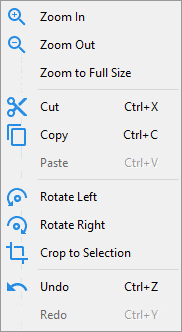
The Image Selection popup menu appears over a TImageEnView if:
◼PopupMenus includes ievSelection
◼A selection has been clicked on
◼A layer has not been clicked on
Note:
◼For more in-depth customization of popup menu items, use the OnAddPopupMenuItem event
◼To remove or change the hue to popup menu item glyphs, use PopupMenuImageHue
◼To use the popup menu in a DLL, you must enable EnableDLLMode
Default: [ivbImageClipboard, ivbImageEditOther]
Example
// When a selection is clicked, show clipboard itemsIEGlobalSettings().ImageSelectionPopupMenu := [ ivbImageClipboard ];
ImageEnView1.PopupMenus := [ ievSelection ];
See Also
◼PopupMenus◼ImageEditingPopupMenu
◼ImageViewingPopupMenu
◼LayerEditingPopupMenu
◼LayerSelectionPopupMenu
◼PdfEditingPopupMenu
◼PdfViewingPopupMenu
◼PopupMenuImageHue
◼OnAddPopupMenuItem