TImageEnView.Select
Declaration
procedure Select(x1, y1, x2, y2: integer; Op: TIESelOp = iespReplace); overload;procedure Select(R: TRect; Op: TIESelOp = iespReplace); overload;
Description
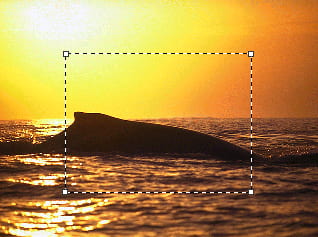
Selects a portion of the image.The selected area will be outlined with an animated rectangle.
If SelectionBase is iesbClientArea (default) all coordinates depend on actual zoom and scrolling.
If SelectionBase is iesbBitmap, all coordinates refer to bitmap pixels.
| Parameter | Description |
|---|---|
| x1 | Top-left horizontal position |
| y1 | Top-left vertical position |
| x2 | Bottom-right horizontal position. Last column not selected |
| y2 | Bottom-right vertical position. Last row not selected |
| Op | Selection operation (add or replace selection). If Op is iespReplace, Select replaces all previous selections. If Op is iespAdd, Select adds a new selection |
The style of selection are specified by:
◼SelColor1
◼SelColor2
◼SetSelectionGripStyle
Note
x2, y2 represent the right/bottom margin (i.e. those pixels are not selected).
ImageEnView1.SelectionBase := iesbBitmap;
ImageEnView1.Select( 100, 100, 200, 200 );
Caption := format(' %d,%d,%d,%d', [ ImageEnView1.SelX1, ImageEnView1.SelY1, ImageEnView1.SelX2, ImageEnView1.SelY2 ]);
// Caption will be: 100,100,199,199
To select an area of 1x1 pixels, you would use 0,0,1,1 (as the column 1 and the row 1 aren't selected).
Demo
 | Demos\ImageEditing\EveryMethod\EveryMethod.dpr |
Examples
Also see: Automated Samples
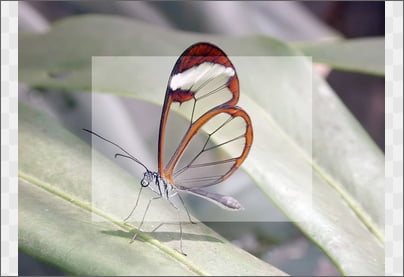
// Add a rectangular selection and adjust levelsImageEnView1.SelectionBase := iesbBitmap;
ImageEnView1.Select( 160, 120, ImageEnView1.IEBitmap.Width - 160, ImageEnView1.IEBitmap.Height - 120 );
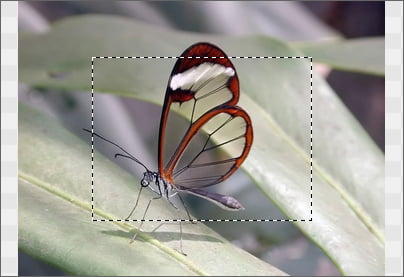
ImageEnView1.Proc.AdjustLevels( 0, 115, 255, 0, 255 );
// Enlarge the selection by ten pixels on all sides
ImageEnView1.SelectionBase := iesbBitmap;
ImageEnView1.Select( ImageEnView1.SelX1 - 10, ImageEnView1.SelY1 - 10, ImageEnView1.SelX2 - 10, ImageEnView1.SelY2 - 10 );
// Select entire image
ImageEnView1.Select( 0, 0, MAXINT, MAXINT );
// Test if the image is blank (with 1% threshold and ignoring the border area)
threshold := 1.0; // Allow 1% of image to be a different color
borderPerc := 10; // Border area is 10% of width/height
ImageEnView1.SelectionBase := iesbBitmap;
ImageEnView1.Select( MulDiv( ImageEnView1.IEBitmap.Width, borderPerc, 100 ),
MulDiv( ImageEnView1.IEBitmap.Height, borderPerc, 100 ),
MulDiv( ImageEnView1.IEBitmap.Width, 100 - borderPerc, 100 ),
MulDiv( ImageEnView1.IEBitmap.Height, 100 - borderPerc, 100 ));
if ImageEnView1.Proc.GetDominantColor(cl) >= 100 - threshold then
ShowMessage('Image is blank!')
else
ShowMessage('Image is NOT blank!');
ImageEnView1.Deselect();
// Select whole image and allow user to deselect circular regions
With ImageEnView1 do
begin
SelectionBase := iesbBitmap;
Select( 0, 0, IEBitmap.Width, IEBitmap.Height );
ShiftKeyLock := [ iessCtrl_SubFromSel ];
MouseInteractGeneral := [ miSelectCircle ];
end;
// Subtract a circular area from a rectangular selection
ImageEnView1.Select( 42, 133, 326, 214, iespReplace );
ImageEnView1.SelectEllipse( 145, 130, 155, 170, iespSubtract );

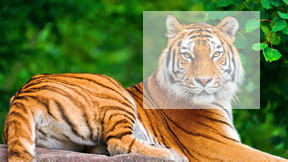
// Apply negative effect at 50% intensiry
ImageEnView1.SelectionMaskDepth := 8;
ImageEnView1.SelectionIntensity := 128; // 128=50% selected
ImageEnView1.Select( 10, 10, 100, 100 );
ImageEnView1.Proc.Negative();
Other Selection Methods
◼SelectEllipse◼SelectMagicWand
◼SelectChromaKey
◼SelectRoundRect
◼SelectShape
◼SelectCustom
View a preview of all selection types
See Also
◼SelectionBase◼InvertSelection
◼Deselect
◼SelX1
◼SelY1
◼SelX2
◼SelY2
◼SelectedRect