TImageEnMView.ThumbWidth
Declaration
property ThumbWidth: Integer;Description
Specifies the width of the thumbnails displayed in the TImageEnMView.If ThumbWidth < 0, then the thumbnail width is automatically calculated to fit that number of columns, e.g. ThumbWidth = -1, the thumbnails will be the width of the control, -2, there will be two columns of thumbnails, etc.
Note: This is the width of the thumbnail frame (when the Style is iemsFlat). The thumbnail image itself will be ThumbWidth less LeftGap and RightGap . See ThumbSizeInfo for actual display size. Use SetThumbnailSize to set the display size of the image itself.
TImageEnMView Default: 100;
TImageEnFolderMView Default: 130
TImageEnLayerMView Default: 120
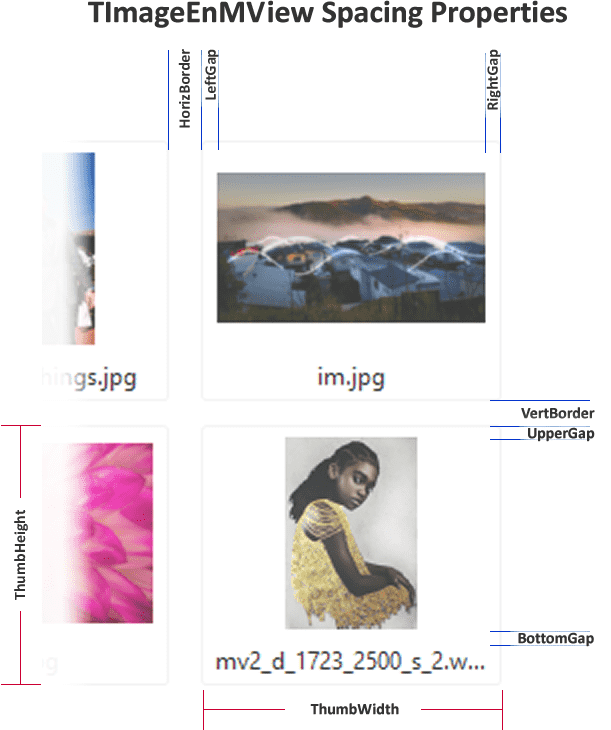
Demos
 | Demos\Multi\Multiview2\Multiview2.dpr |
Examples
// Store images in control as 120 x 100 thumbnailsImageEnMView1.ThumbWidth := 120;
ImageEnMView1.ThumbHeight := 100;
ImageEnMView1.StoreType := ietThumb;
// Fit thumbnails to the size of the control
ImageEnMView1.ThumbWidth := -1;
ImageEnMView1.ThumbHeight := -1;
// Show a PDF document in a 2x2 layout
const
HORZ_COUNT = 2;
VERT_COUNT = 2;
begin
ImageEnMView1.LockUpdate();
try
ImageEnMView1.GridWidth := -1;
ImageEnMView1.ThumbWidth := -1 * HORZ_COUNT;
ImageEnMView1.ThumbHeight := -1 * VERT_COUNT;
ImageEnMView1.ScrollBars := ssVertical;
ImageEnMView1.LoadFromFileOnDemand( 'D:\MultiPageDoc.pdf' );
finally
ImageEnMView1.UnlockUpdate();
end;
end;
See Also
◼ThumbHeight◼SetThumbnailSize
◼ThumbSizeInfo
◼StoreType